Minimal Line or Color Realism for Your Pet Portrait?
Published 2026-09-16
Compare TailGift's Minimal Line and Color Semi-realistic styles using existing pet artwork examples, then choose what matters most: outline, coat color or illustrated detail.
Artwork generation is available. Upload a photo and choose an available style. Each successful artwork uses 1 Ink point; failed generations return their reserved Ink points. Purchasing is not open yet. Coming Soon products remain previews.
Choose the Details That Make Your Pet Familiar
Minimal Line and Color Realism put the emphasis on different parts of a pet portrait. Minimal Line uses restrained outlines and a few identifying details. The lifelike illustrated option discussed here as Color Realism appears in TailGift's current style collection as Color Semi-realistic.
Start with one question: would you miss the shape of your pet's ears and expression most, or the colors and patches in their coat? Your answer is more useful than choosing whichever example looks most elaborate.
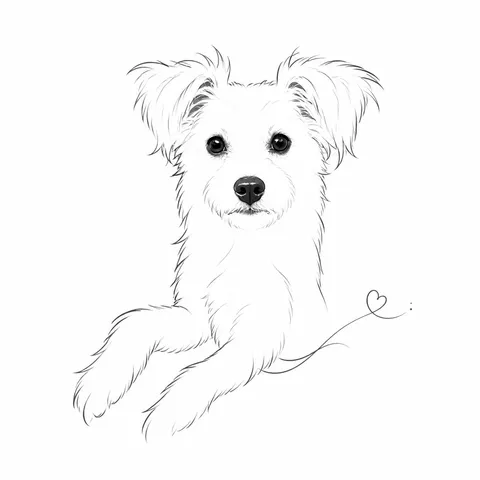
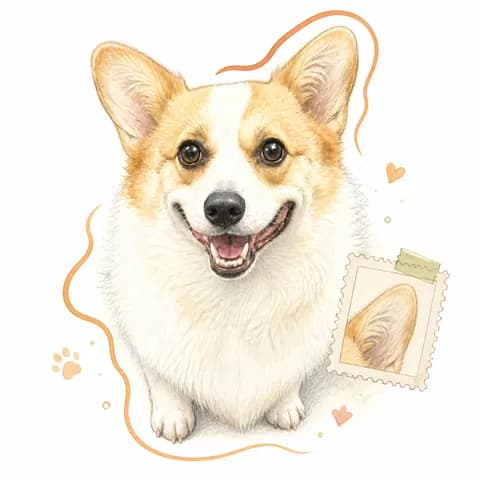
The two images above are existing TailGift style examples: Mini in Minimal Line first, followed by Diandian the corgi in Color Semi-realistic. They show different pets, so they help explain the visual treatments rather than prove how one photo will perform in both styles.
Minimal Line Emphasizes Outline and Expression
In Mini's example, light drawn marks describe the ears, face and front legs, with darker eyes and nose giving the face a focal point. Much of the surrounding area stays white. The portrait feels spare because it uses selected details rather than filling every part of the coat.
Choose this direction if you like a quiet drawing and recognize your pet through their silhouette, ear shape or expression. A clear reference with an easy-to-read outline helps you judge whether those features remain familiar.
Most color and texture are simplified. If a ginger patch, a blue-gray coat or two differently colored eyes is the main feature you want to celebrate, consider whether losing some of that color would disappoint you. Minimal Line is also a separate style from Fine Line Tattoo; use the exact style name when selecting it.
Color Realism Gives Coat Color More Room
Diandian's Color Semi-realistic example uses warm tan and white areas, soft shading and drawn fur detail to describe the corgi's face. There is more color information to look at, while the result still reads as an illustration rather than an unchanged photograph.
Start with this option if coat patches, the color around the eyes or the transition between light and dark fur matter to you. Use a well-lit reference with sharp eyes and visible markings so you can compare the result with details that are actually present in the photo.
A detailed style is not a promise of exact color or likeness. Lighting, the reference and the generated interpretation can all affect the result. Treat decorative details in a showcase image as part of that example, not as a guarantee that your artwork will receive the same border, accent or arrangement.
Keep the Photo, Mode and Framing Consistent
Style controls the visual treatment. Creation mode and framing are separate choices in the creator. Pet portrait, AI creativity and You & your pet set different creative directions; Auto, Head, Half body and Full body guide the composition.
If your aim is to compare the two styles, keep the reference photo, creation mode and framing the same. Changing the pose, photo lighting and style at once makes it harder to see why you prefer one result.
Start from a reference that shows the features you want to keep. Selecting Full body does not make hidden paws or a cropped tail reliable reference details. Likewise, a white-background showcase does not establish that every mode and style combination will produce the same background.
Review Recognition at the Size You Will Use
After generating, compare each artwork with the reference. Look at the eyes, ears, muzzle and distinctive markings. For Minimal Line, check whether the few remaining marks still suggest your pet. For Color Semi-realistic, check both the shapes and how the coat colors have been interpreted.
Then look at the artwork smaller on screen. A fine line or small patch can be easy to see when enlarged and less obvious in a compact layout. This is a readability check, not proof of a physical print size, material or finished product quality.
Neither style is automatically better for every pet. Choose the result whose important details you like, rather than assuming that more detail always means more resemblance.
Compare Within Your Current Ink Point Balance
The current registration grant is 5 Ink points, and each generated artwork uses 1 Ink point. Comparing two newly generated artworks uses 2 Ink points if both succeed. Failed generations return their reserved Ink points.
The creator supports up to four available styles in a batch, subject to your balance and current generation allowance. Check which styles are available in the creator before starting; being able to browse a style does not always mean it is open for generation.
Keep a favorite in your gallery and reuse the existing artwork in supported design flows when useful. Reusing that artwork does not request another generation or spend more Ink points. Product purchasing is a separate capability, so an artwork or design preview is not an order.